Generative Engine Optimization
How to Measure Your Visibility in AI Search
AI visibility doesn't come in one tidy dashboard. Here's the measurement system I use with clients: a fixed prompt set, a simple scoring sheet, and the analytics signals that confirm whether the work is paying off.

Sheikh Sadikur, SEO, AEO & GEO consultant
Published · 9 min read

To measure AI search visibility, track a fixed set of real buyer prompts across the main AI assistants every month and record whether your brand is named, whether your site is cited, how you're described and which competitors appear. Then confirm the trend with Search Console data, AI referral traffic in analytics and growth in branded searches. No single tool shows all of this, so a simple, consistent system beats an expensive dashboard.
Clients often ask me "are we showing up in ChatGPT?" after trying one search on their phone. One search tells you almost nothing. AI answers vary with phrasing, location, account history and even between two runs of the same question. This guide is the system I use to replace anecdotes with trends.
Why AI visibility is hard to measure
Traditional SEO measurement is mature: rank trackers, Search Console, analytics. AI search breaks several assumptions:
- There's no stable position. An AI answer isn't a ranked list of ten links. Your brand might be named first, mentioned in passing or not at all.
- Answers vary. The same prompt can produce different answers on different days or for different users.
- Clicks are optional. Someone can read an answer that recommends you and contact you directly without clicking a citation.
- Data is incomplete. Google includes AI Overview and AI Mode traffic in Search Console's web search data but doesn't break it out separately. Other assistants share little data with site owners.
The answer is to measure several imperfect signals consistently and look for agreement between them.
Step 1: build your prompt set
The prompt set is the foundation. It should reflect what real buyers ask, not what you wish they'd ask.
Where prompts come from
- Search Console queries, especially longer question-style ones.
- Sales and support conversations: emails, WhatsApp messages, call notes.
- People Also Ask and AI Mode follow-up suggestions for your main topics.
- Your keyword research, rewritten as natural questions. I explain how in keyword research for AI search.
Mix the types
A balanced set includes:
| Prompt type | Example | What it tests |
|---|---|---|
| Brand | "What does [your business] do?" | Whether AI describes you accurately |
| Recommendation | "Best [service] in [location]" | Whether you're named as an option |
| Problem | "How do I fix [problem you solve]?" | Whether your content is cited as the expert source |
| Comparison | "[You] vs [competitor]" | How you're positioned against alternatives |
| Specific question | "How long does [service] take?" | Whether your answer-first pages are used |
Size and stability
Twenty to fifty prompts is enough for most businesses. Keep the wording fixed once you start, so month-to-month changes reflect your visibility, not your wording. Add new prompts in a separate section rather than editing old ones.
Step 2: choose the assistants to track
Track the products your buyers actually use. For most of my clients, that's:
- Google (AI Overviews and AI Mode), because it's where most searches still start.
- ChatGPT with search enabled.
- Perplexity, which cites sources prominently.
- Gemini and Copilot for audiences that use them.
You don't need all five for every prompt every month. Covering Google and ChatGPT consistently is better than covering everything occasionally.
Step 3: run the prompts consistently
Consistency matters more than volume:
- Same conditions each time: a logged-out or fresh session where possible, the same location settings, search enabled in assistants that offer a toggle.
- Same time of month, so seasonal changes are visible.
- Save the evidence: a screenshot or copy of each answer, with the date.
- Run important prompts twice. If the two runs disagree, record both. Variance is itself useful information.
Step 4: score each answer
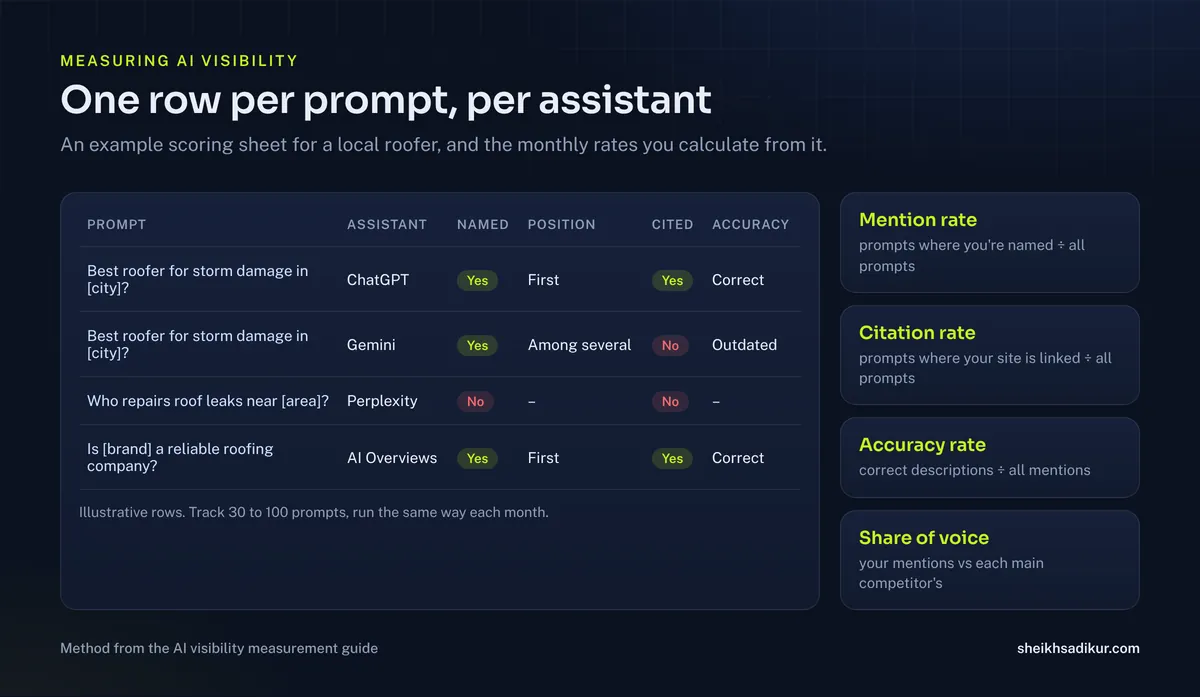
I use a simple scoring sheet with one row per prompt per assistant:
| Column | What to record |
|---|---|
| Named | Yes or no: is your brand mentioned? |
| Position | First, among several, or in passing |
| Cited | Is a URL from your site linked as a source? Which one? |
| Accuracy | Is the description correct, outdated or wrong? |
| Competitors | Which competitors are named? |
| Sources | Which third-party sources are cited? |
From this you can calculate a few headline numbers each month:
- Mention rate: the share of prompts where you're named.
- Citation rate: the share where your site is linked.
- Accuracy rate: the share of mentions that describe you correctly.
- Share of voice: your mentions compared with each main competitor's.
The Sources column is often the most valuable. If ChatGPT keeps citing the same directory or review site when it recommends competitors, that source is your next outreach target.
Step 5: read Search Console
Google's AI features are included in Search Console's Performance report under web search. You can't filter them separately, but you can watch for patterns:
- Impressions for question queries on pages you've restructured answer-first.
- Click-through rate changes on pages that appear in AI Overviews, which can shift in either direction.
- New queries that start bringing impressions after you add FAQ sections.
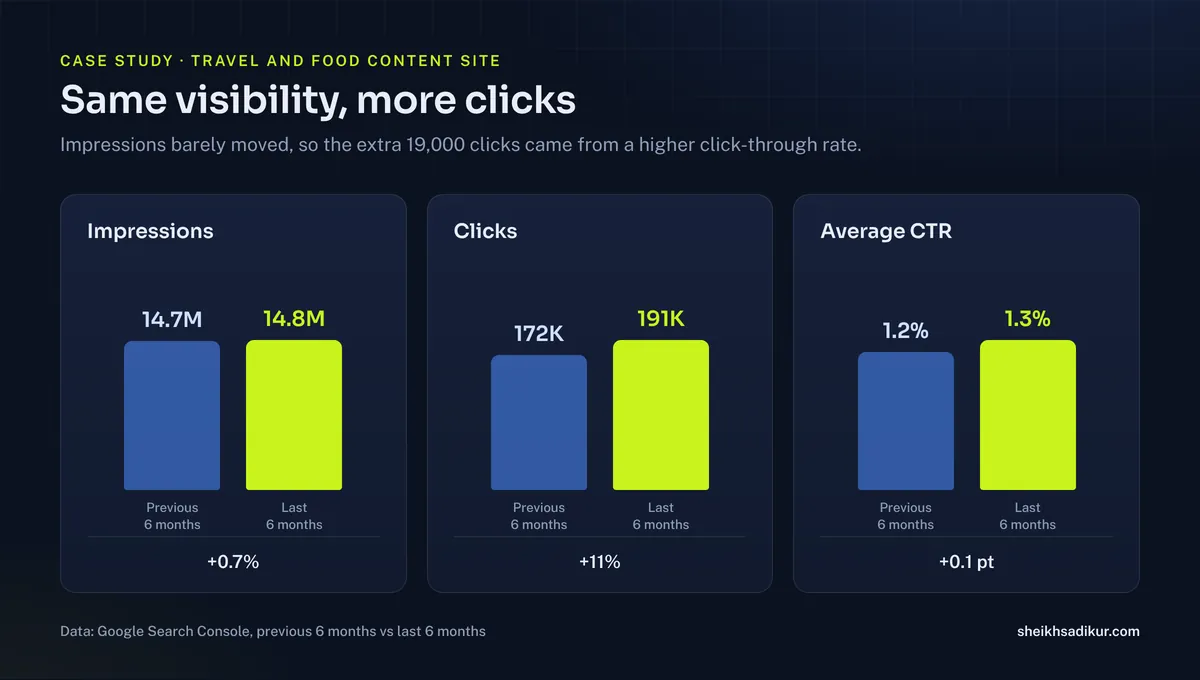
For a large travel and food content site I work with, impressions held almost flat at 14.7M to 14.8M over two six-month periods while clicks rose 11%, from 172K to 191K, and average CTR moved from 1.2% to 1.3% (case study). Reading CTR alongside impressions is what showed that the gains came from earning more clicks per appearance, not from a temporary ranking spike.
Step 6: track AI referral traffic
When people click citations in AI answers, they arrive as referral traffic. In analytics, look for sources such as:
chatgpt.com(ChatGPT also often appendsutm_source=chatgpt.comto links)perplexity.aigemini.google.comcopilot.microsoft.com
Create a channel group or segment for these sources so you can watch the trend. Two cautions:
- Some AI traffic arrives without a referrer and shows as direct, so referral numbers undercount.
- Many AI-influenced buyers never click. They read a recommendation and search your name or contact you directly.
That second point is why the next signal matters.
Step 7: watch branded demand
If AI assistants recommend you more often, more people search for your name. Track:
- Branded search impressions and clicks in Search Console (filter queries containing your brand).
- Direct traffic trends.
- "How did you hear about us?" answers from new leads. Add "AI assistant (ChatGPT, Gemini, etc.)" as an option on your contact form or intake call.
That last one is low-tech and surprisingly informative.
Step 8: turn data into decisions
Measurement only matters if it changes what you do next. This table maps what I typically see to the action I take:
| What the data shows | Likely cause | Next action |
|---|---|---|
| Not named, not cited anywhere | Access or authority gap | Check crawler access and indexing, then corroboration |
| Cited for questions, not named for recommendations | Content is good, entity is weak | Entity clean-up, reviews, mentions |
| Named but described inaccurately | Inconsistent information online | Align profiles with your canonical description |
| Competitors cited from specific directories | Missing listings | Get listed with consistent details |
| Strong in Google, absent in ChatGPT | Bing visibility or OAI-SearchBot access | Verify Bing Webmaster Tools, check robots.txt |
| Mentions rising, referral traffic flat | Buyers act without clicking | Watch branded search and lead-source answers |
The causes column maps to the pillars in what is generative engine optimization, so each finding points to a specific type of work.
Worked example: a prompt set for a local roofer
Here's how I'd build a starter set for a roofing contractor in South Florida. The point is to see the mix, not to copy the exact wording.
Brand prompts (3):
- What is [Company] in [city]?
- Is [Company] a licensed roofer?
- What services does [Company] offer?
Recommendation prompts (5):
- Best roofing contractors in Broward County
- Reliable roofer for storm damage repair near Fort Lauderdale
- Who installs metal roofs in South Florida?
- Roofing company with good reviews in [city]
- Who can inspect my roof after a hurricane?
Problem prompts (6):
- How do I know if my roof needs replacing after a storm?
- What does a roof inspection include?
- How long does a roof replacement take in Florida?
- Does homeowners insurance cover roof damage from wind?
- What is the difference between roof repair and roof replacement?
- How much does a roof inspection cost?
Comparison prompts (2):
- [Company] vs [competitor]
- Metal roof vs shingle roof in Florida
That's 16 prompts. Run them in Google and ChatGPT each month and you have 32 data points, enough to spot a trend over a quarter. As the business grows its content, add prompts that match new service pages.
What progress usually looks like
Clients often expect a straight line. In practice, AI visibility tends to move in steps:
- Accuracy improves first. Once profiles and the website agree, assistants describe the business correctly, even before it's recommended more often.
- Problem prompts come next. Answer-first pages start being cited for specific questions, because that depends mostly on content quality.
- Recommendation prompts move last. Being named as a provider depends on corroboration: reviews, mentions and listings, which take months to accumulate.
If you see that order, the work is on track. If accuracy is still poor after a few months, go back to entity consistency before investing more in content.
Tools: what helps and what to watch out for
Several SEO platforms now offer AI visibility tracking that runs prompts automatically and reports mentions and citations. They save time, especially across many prompts. Before relying on one:
- Check how it runs prompts: which assistants, which locations, logged in or not.
- Check sample size: a single run per prompt per month is noisy.
- Check the prompts themselves: tool-generated prompts may not reflect how your buyers ask.
I often combine a tool for breadth with a small manual set for the prompts that matter most commercially.
A simple monthly report
Each month, my clients get one page:
- Headline numbers: mention rate, citation rate, accuracy rate, share of voice versus two competitors.
- What changed: prompts where visibility was gained or lost, with the likely reason.
- Supporting signals: Search Console impressions and CTR for target pages, AI referral sessions, branded search trend.
- Next month's actions: two or three specific tasks tied to the findings.
The goal is a trend line over six to twelve months, not a verdict after four weeks.
Who should own AI visibility tracking
In small businesses, this usually falls to whoever handles SEO. That works, as long as one person owns the prompt set and runs it the same way every month. When ownership rotates, prompts drift, conditions change and the data stops being comparable.
For agencies and consultants reporting to clients, keep the raw evidence (screenshots or copied answers) in a shared folder by month. When a client asks why a number changed, you can show exactly what the assistant said, rather than relying on memory.
Common mistakes
- Changing the prompts every month, which makes comparisons meaningless.
- Testing while logged in to your own account, where personalization can favor sites you visit.
- Celebrating one screenshot. One good answer isn't a trend.
- Ignoring accuracy. Being mentioned with wrong services or an old address can hurt more than not being mentioned.
- Measuring only clicks. Much of AI's influence happens without a click.
Frequently asked questions
Can I see AI Overview traffic in Google Search Console?
Partly. Google includes clicks and impressions from AI Overviews and AI Mode in the Performance report under web search, but doesn't provide a separate filter for them. Watch question-query impressions and click-through rate on pages you've optimized to infer the effect.
How do I track traffic from ChatGPT?
In analytics, look for referral traffic from chatgpt.com, and for the utm_source=chatgpt.com parameter that ChatGPT often adds to links. Some AI traffic arrives without a referrer and appears as direct, so treat referral numbers as a minimum, not the full picture.
How many prompts should I track?
Twenty to fifty prompts covers most businesses. Mix brand, recommendation, problem, comparison and specific-question prompts, keep the wording fixed over time, and run the most important ones more than once per month because answers vary.
How often should I measure AI visibility?
Monthly works well for most businesses. AI answers vary too much for weekly checks to be meaningful on a small prompt set, and quarterly is too slow to connect changes to the work you did. Review trends over six to twelve months.
What is a good AI mention rate?
There's no universal benchmark, because it depends on your market and prompt set. Compare yourself with your main competitors on the same prompts and focus on the direction of change. Being named in a growing share of recommendation prompts is the signal that matters.