Backlinks and Authority
Toxic Backlinks: When to Disavow, When to Ignore, and How to Do It Right
Most spammy links don't need a disavow. Some situations absolutely do. After cleaning up more than 5,000 spam domains across client sites, here's how I decide, and how I build a file that removes risk without throwing away good links.

Sheikh Sadikur, SEO, AEO & GEO consultant
Published · 9 min read

A disavow is a list of domains or URLs you submit to Google asking it to ignore those links when assessing your site. You need one when you have a manual action for unnatural links, or a large pattern of spammy, paid or manipulative links you're worried about, such as a sudden flood of toxic domains. For a handful of random low-quality links, you usually don't: Google says it already ignores most spammy links automatically.
Toxic link cleanup is one of my core services. Across two client projects alone, I reviewed and disavowed more than 5,000 spam domains: 1,347 for a US roofing contractor (case study) and 4,093 across two sites in a sports publisher network (case study). This guide explains how I decide when to disavow and how I do it without damaging genuine links.
What "toxic backlinks" actually means
"Toxic" isn't a Google term. It's a label SEO tools use for links they estimate are risky, based on patterns such as:
- Links from sites that exist only to sell or exchange links.
- Scraper sites that copy content and links automatically.
- Link networks and private blog networks (PBNs).
- Casino, adult and pharmaceutical spam domains unrelated to your site.
- Sites with obvious spam signals: auto-generated content, thousands of outbound links, foreign-language spam.
- Exact-match anchor text patterns that look manipulated.
Tools like Semrush's Backlink Audit assign each referring domain a toxicity score and an overall profile score. These are estimates, useful for finding candidates, not verdicts. Every flagged domain still needs a human look.
What Google says about disavowing
Google's position, consistent over many years:
- Its systems are good at identifying and ignoring spammy links, so most sites never need to disavow.
- The disavow tool is an advanced feature that should be used with caution.
- It's appropriate when you have a manual action for unnatural links, or when you have a considerable number of spammy, artificial or low-quality links pointing to your site, especially ones you or someone working for you built, that you're confident are causing or could cause problems.
- Disavowing doesn't delete links. It asks Google not to count them.
That's why my default answer to "should I disavow?" is "show me the profile first".
When I recommend a disavow
From client work, these are the situations where a disavow is worth doing:
| Situation | Why it's worth it |
|---|---|
| Manual action for unnatural links | Required as part of the reconsideration process |
| Large, sudden spike of spam domains | Protects a small genuine profile from being drowned out |
| Past paid links or link schemes | Removes links you can't get taken down |
| Hacked site that attracted spam links | Cleans up links pointing to spam pages and your domain |
| HIGH toxicity on a large aging profile | Reduces risk where spam has accumulated for years |
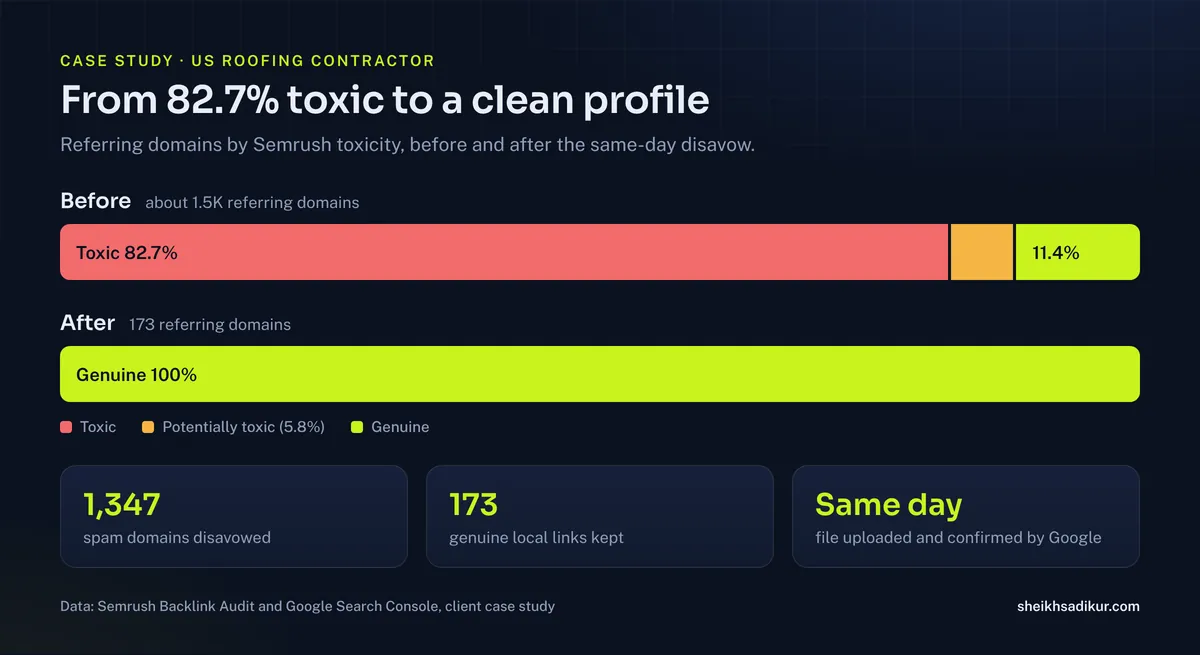
The roofing case is a clear example. Semrush flagged a spike of 639 new referring domains, 633 of them toxic, on top of a small, real local profile. Before cleanup, toxic referring domains made up 82.7% of the profile. Only 173 domains were genuine, such as local directories and partners.
When I recommend leaving it alone
- A few random spam links. Every site gets some. Google ignores them.
- Low-quality but relevant links, such as small local directories or niche blogs. Low authority isn't the same as manipulative.
- Links you can remove at the source, for example a link you paid for on a site you can contact.
- Sister sites or partner sites that tools flag because of overlapping ownership. In the sports network project, two smaller sister sites had 25 and 23 referring domains, 100% non-toxic, so no disavow was needed.
Step 1: collect the full link data
No single tool sees every link. I combine:
- Google Search Console → Links → export top linking sites and latest links.
- Semrush Backlink Audit (or a similar tool) for toxicity estimates and anchor data.
- Bing Webmaster Tools backlink data, for another view.
Merge them into one list of referring domains with their link counts, anchors, first-seen dates and toxicity scores.
Step 2: look for patterns over time
Before reviewing domains one by one, look at the profile's shape:
- A timeline of new referring domains. A sudden spike usually means spam, an attack or a hack.
- Anchor text distribution. A profile dominated by exact-match commercial anchors, or by gambling and pharma terms, is a warning sign.
- Top-level domains and languages. Clusters of unrelated foreign-language domains often indicate spam networks.
- Target pages. Links pointing to pages that no longer exist, or to spam pages from a past hack, tell you where the problem came from.
Step 3: review flagged domains by hand
This is the step most people skip, and it's the one that protects you. For each flagged domain, I check:
- Is the site real? Does it have genuine content and a purpose beyond linking?
- Is it relevant? Does the topic relate to your business or region?
- How does it link? A natural mention in content, a directory listing or a footer link on thousands of pages?
- Does it look automated? Scraped content, spun text, sitewide spam.
- Is it a partner, client or directory you value?
Anything genuine stays out of the file, whatever the tool's score. On the sports network, Site A had 1,067 toxic and 931 potentially toxic domains flagged, and Site B had 2,619 toxic and 888 potentially toxic. Reviewing them by hand meant genuine links stayed and only spam and link-network domains went into the files.
Step 4: choose domain or URL rules
A disavow file supports two kinds of rule:
# Spam network, whole domain
domain:spam-example.com

# One bad page on an otherwise normal site
https://normal-site.example/bad-page.html
My rules for choosing:
- Domain-level when the whole site is spam. This also covers new spam pages that appear on that domain later.
- URL-level when only one page is a problem and the rest of the site is legitimate.
For the sports network, Site A's file had 1,250 domains plus 1,080 URLs, and Site B's had 2,843 domains plus 867 URLs. The roofing file was purely domain-level, with 1,347 entries.
Step 5: build the file correctly
Format rules:
- A plain .txt file, encoded in UTF-8.
- One rule per line:
domain:example.comor a full URL. - Lines starting with
#are comments, useful for notes and dates. - Google documents size limits on the file; very large profiles need consolidation into domain rules.
The most important rule of all: uploading a new file replaces the previous one. If you upload only this month's new spam, last month's entries are no longer disavowed. I keep a master file per site, with dated comment sections, and always upload the full master.
Step 6: upload and confirm
- Open Google's disavow links tool for the correct Search Console property.
- Upload the file.
- Save the confirmation. In the roofing case, Search Console's notice and email confirmed the upload the same day.
The file is applied gradually as Google recrawls the linking pages, so ranking effects, if any, are gradual too.
Step 7: re-audit and monitor
After uploading, I run a fresh audit, marking disavowed domains in the tool, to confirm the profile now looks clean:
| Metric | Roofing before | Roofing after |
|---|---|---|
| Overall toxicity score | HIGH | LOW |
| Toxic referring domains | 1.3K (82.7%) | 0 (0%) |
| Potentially toxic domains | 88 (5.8%) | 0 (0%) |
| Non-toxic domains | 173 (11.4%) | 173 (100%) |
For the sports network, both main sites went from HIGH to LOW, with Site B's toxic share going from 48% to 0%.
Then monitoring:
- Monthly checks for small local businesses, because spam spikes can arrive at any time.
- Quarterly checks for larger sites with stable profiles.
- Immediate checks after a hack, a ranking drop or a Search Console notice.
What a disavow doesn't do: it doesn't remove the links from the web. The "after" numbers show the spam is now excluded from the profile, not that it disappeared. My negative SEO guide covers what to do when spam keeps coming.
How I explain a disavow to clients
Clients often expect a disavow to be a ranking boost. I explain it differently: it's risk removal. Think of it as telling Google, on the record, "these links aren't ours and we don't want credit for them". If a spam wave or old paid links were holding a site back, removing that risk can help. If they weren't, nothing visible changes, and that's fine.
I also set expectations about time. The confirmation from Search Console can arrive the same day, but Google applies the file as it recrawls the linking pages, which happens gradually. Any effect on rankings is gradual too.
Questions to ask before hiring someone for link cleanup
Link cleanup is easy to sell and easy to do badly. Before hiring anyone, including me, ask:
- Will you review every domain by hand? If the answer is "the tool handles it", walk away.
- Will I get the file and the reasoning? You should receive the disavow file and notes on why each group of domains was included.
- How do you handle genuine links the tool flags? A good answer mentions directories, partners and relevant local sites staying out of the file.
- Will you merge with my existing file? If a disavow file already exists, it must be preserved and extended.
- How will we confirm the result? Expect a re-audit and before-and-after numbers.
Common disavow mistakes
- Uploading an automated list without review, which throws away genuine links.
- Uploading only new entries and wiping out the previous file.
- Disavowing whole platforms like large blogging or social sites, where only one page is spam.
- Disavowing in a panic after a ranking drop without evidence that links caused it.
- Expecting instant ranking gains. A disavow reduces risk; it isn't a growth tactic.
- Ignoring the cause. If links point to spam pages from a hack, clean up the hack first. See removing hacked spam pages.
Keeping a clean profile after the cleanup
The best long-term protection is a growing base of genuine links. A profile with thousands of real, relevant referring domains is far less exposed to a spam wave than one with a few hundred. Cleanup removes risk; earning good links reduces future risk.
Disavow and AI search
AI search doesn't change the basics, but a clean profile matters for trust. Spam links pointing at gambling and pharma pages on your domain associate your site with topics that have nothing to do with your business. The positive side of the same coin is earning genuine mentions and links, which I cover in link building for AI search.
The short version
Don't disavow by default. Look at the profile, review every flagged domain by hand, disavow only clear spam and manipulation, keep one master file, confirm the upload and check again regularly. That process protects you from spam without throwing away the genuine links you've earned.
Frequently asked questions
Do I need to disavow toxic backlinks?
Usually not for a few random spam links, which Google ignores on its own. A disavow makes sense when you have a manual action for unnatural links, a large spike of spam domains, or past paid or manipulative links you can't remove. Review the profile before deciding.
Does disavowing remove backlinks?
No. Disavowing asks Google to ignore the listed links when assessing your site. The links still exist on the web. After a disavow, tools that let you mark disavowed domains will show them excluded from the profile, but the pages themselves are unchanged.
Should I disavow domains or URLs?
Disavow the whole domain when the entire site is spam, which also covers future spam pages on it. Use URL-level rules when only one page on an otherwise legitimate site is the problem. Most spam cleanup files are mainly domain-level.
What happens if I disavow good links by mistake?
Google will ignore those links too, so you lose whatever value they passed. You can fix it by removing them from your master file and uploading the corrected file, but Google needs to recrawl before the change applies. That's why reviewing every domain by hand matters.
How often should I check for toxic backlinks?
Monthly for small local businesses, because a spike of spam domains can arrive at any time and quickly outnumber a small genuine profile. Quarterly is usually enough for larger, stable sites, with an immediate check after a hack or a Search Console notice.